
Google Sheets vs Attendance Software: Which One Actually Works for Teachers?
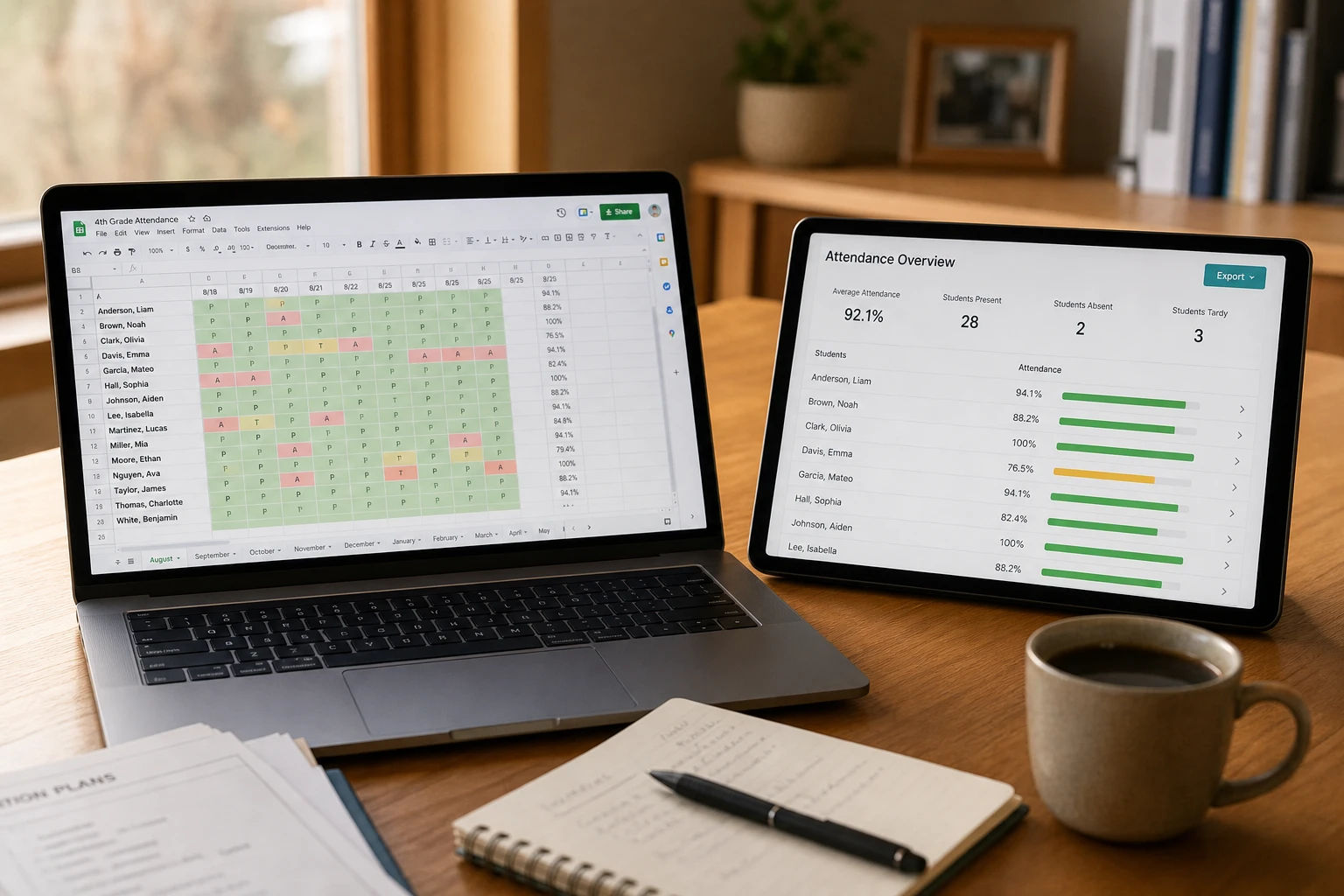
If you have been tracking student attendance in Google Sheets, there is a good chance you built your own system from scratch. A column for each date, a row for each student, a few COUNTIF formulas at the end, and maybe some color coding if you were feeling ambitious that day.
And honestly? It works. For a while.
The problem is not that Google Sheets is a bad tool. It is that it was never designed to be an attendance system. It is a spreadsheet, and using it for attendance is like using a Swiss Army knife to cook dinner. Technically possible, but there is a reason professional kitchens use proper knives.
This article is a straight comparison between running attendance in Google Sheets and using a purpose-built attendance tool. No hype, no vague claims. Just a practical look at what each one actually does well, where each one breaks down, and how to know which one your situation calls for.
First, Let's Give Google Sheets Its Credit
A lot of comparison articles skip straight to bashing whatever the free option is. That is not useful. Google Sheets genuinely does some things well for attendance tracking, and if you are using it right now, you are not wrong for doing so.
It costs nothing. If you have a Google account, you have Google Sheets. For a teacher managing one class with a limited budget, the price alone is hard to argue with.
You already know how to use it. There is no setup, no onboarding, no learning curve. You open a new sheet and start typing. That kind of friction-free start matters when you are already stretched thin.
It is completely flexible. You can structure your sheet any way you want. Add columns for parent contact numbers, notes, roll numbers, house groups, whatever you need. No feature is locked behind a pricing plan.
Sharing is built in. Send a link and someone else can view or edit the same file in seconds. For a single teacher sharing data with a head of department, that simplicity is genuinely useful.
None of that is worth dismissing. For a solo teacher with one class of 25 students who needs a basic record for personal reference, Google Sheets often does exactly enough. The question is what happens when your needs go even slightly beyond that.
What Actually Goes Wrong With Google Sheets Over Time
These are not theoretical problems. These are the things that happen to real teachers, usually about two or three months into a new term.
Formulas break in ways that are hard to spot
COUNTIF formulas are fragile. If you insert a row in the wrong place, reference the wrong column, or accidentally delete a cell, your totals shift. The frustrating part is that a broken formula does not always look broken. It just returns a wrong number, and unless you double-check the math manually, you will not catch it until someone questions your report.
Sharing the file with even one other person multiplies this risk. One accidental edit to a formula row and the entire sheet can be off.
Holidays and off-days require manual adjustments every single time
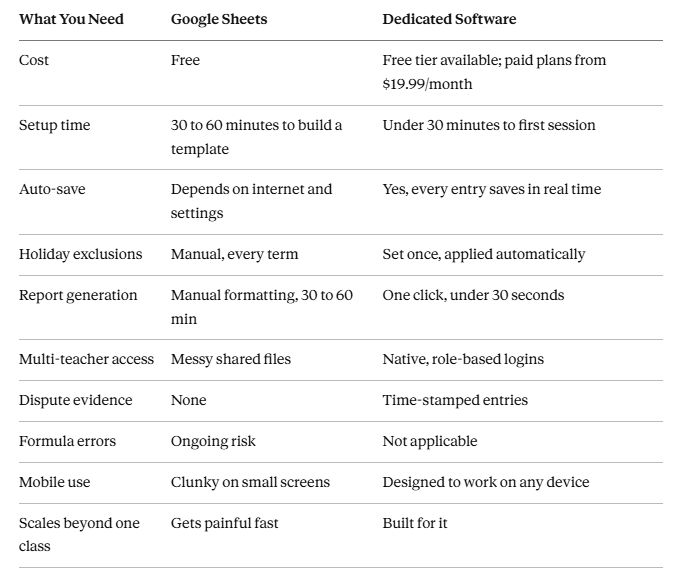
Google Sheets has no concept of a school holiday. If your class did not meet on a public holiday, you have to remember to exclude that date from your denominator when calculating attendance percentages. Forget one holiday across a ten-week term and every student's percentage will be slightly lower than it should be.
Most teachers get burned by this at least once. They share a report, a parent notices the numbers seem off, and the teacher has to go back and recalculate everything by hand.
More than one teacher means version control chaos
One teacher, one file. That setup works. The moment a second teacher needs to mark attendance in the same system, you face a real problem. Do you duplicate the file? Create a tab for each teacher? Who owns the master file? What happens when two people edit simultaneously?
Coaching centers and small schools that try to manage multi-teacher attendance through Google Sheets almost always end up with a scattered collection of files in different formats, none of which can be combined into a single report without significant manual work.
Generating a proper report takes real time
When a parent or an exam board needs an official attendance report, pulling it from a Google Sheet is not a quick task. You have to verify the date range is correct, check that all holidays were excluded, make sure the formulas are referencing the right cells, and then format the output so it looks presentable enough to share.
For one class, that process takes 30 to 45 minutes. If you have five classes and a principal asking for a summary by end of week, you are spending a good chunk of your Friday afternoon on data formatting.
There is no record of who changed what
If a student or parent disputes an attendance entry, your only evidence is the number in the cell. There is no timestamp. No log of who changed what, or when. If the file was shared with another teacher and someone edited an entry after the fact, there is no way to verify the original record.
For schools where attendance determines exam eligibility or affects fee structures, this is a real vulnerability.
What a Purpose-Built Attendance Tool Does Differently
Dedicated attendance software is not just a prettier spreadsheet. The whole thing is designed around the specific job of recording and reporting student attendance, which means the limitations above are not limitations at all.
Here is what changes when you use a tool built for this purpose:
Attendance is marked by clicking, not typing. You see a list of your students, tap or click each one's status, and you are done. Present, Late, Excused Absent, Unexcused Absent. Auto-saved as you go. No formulas, no cell references, no risk of accidentally breaking something.
Holidays are excluded automatically. You mark your off-days and public holidays once at the start of term. From that point, every attendance percentage calculation excludes those dates without you doing anything. A student who attended every actual school day will show 100%, not 91% because three holidays were counted as absences.
Reports take 30 seconds. Select your class, set the date range, click export. A formatted Excel file downloads with every student's full breakdown: total classes, attendance count, absence types, percentages, and notes. The same report you spent 45 minutes building in Sheets takes about four clicks.
Multiple teachers stay separate. Each teacher logs in with their own account and sees only their assigned classes. No shared files, no version conflicts, no accidental overwrites. A manager or admin can see across all classes without everyone being in the same document.
Every entry is time-stamped. If a student disputes their attendance, you can pull up the exact record for any date, see the status that was marked, and read any note that was attached at the time. The record is reliable in a way a shared spreadsheet cannot be.
Academic year boundaries are built in. You set the start and end date for each class's academic year. Every report and calculation automatically stays within those boundaries. Data from last year's class never accidentally appears in this year's report.
Side by Side: The Practical Comparison
When Google Sheets Is Still the Right Call
There are situations where Google Sheets is genuinely the better choice, and it is worth being clear about that.
If you teach one class, have fewer than 30 students, only need attendance records for your own reference, and never have to share formal reports with parents or administrators, Google Sheets does the job fine. The free price and zero learning curve make it a reasonable tool for that specific scenario.
It is also a good way to figure out what you actually need before committing to any paid software. A term in Google Sheets tells you pretty quickly which parts of the process are painful and which features you would actually use in a dedicated tool.
When It Is Time to Move On
The case for switching becomes clear once a few of these apply to you:
You manage more than one class. You have more than 30 or 40 students. You share attendance data with parents or administrators on a regular basis. Another teacher needs to record attendance in the same system. You have had a formula error affect a report at least once. You spend more than 20 minutes generating end-of-term summaries. A student or parent has ever questioned the accuracy of your records. You have forgotten to exclude a holiday from a percentage calculation. You track attendance across multiple academic years.
If you are nodding at three or more of those, the spreadsheet is already costing you more time and accuracy than you probably realise.
Why DigiAttend Is Worth a Look
DigiAttend is built specifically for teachers, tutors, and coaching centers who are ready to move past spreadsheets but do not want a complicated enterprise system that takes weeks to set up.
The free plan gives you one class, up to 30 students, and full access to the core features: bulk student import, Excel report export, off-day management, per-student notes, and academic year boundaries. No credit card required. If you are currently using Google Sheets for a single class, the free plan of DigiAttend does the same job with none of the manual overhead.
The Teacher plan at $19.99 per month supports up to five classes and 200 students. That covers most individual teachers who have grown past a single spreadsheet. Annual billing brings it down to roughly $16.99 per month.
For coaching centers with more than one instructor, the Tutor+ plan at $34.99 per month adds multi-teacher accounts, a manager dashboard, and an announcements system. Up to three teacher accounts and ten classes, which is enough for most small tutoring operations.
Setup takes under 30 minutes. Create an account, build your class, upload your student list from the spreadsheet you already have, mark your holidays, and start marking attendance. The first real report you generate from DigiAttend will probably be the moment you stop thinking about going back to Sheets.
Frequently Asked Questions
Q1: Can I bring my existing Google Sheets student list into DigiAttend?
Yes. DigiAttend has a bulk import feature that accepts Excel files. Export your student list from Google Sheets as an XLSX or CSV file, match the columns to the import template, and upload it. Your full student list is ready in seconds. No retyping.
Q2: Is Google Sheets good enough for a coaching center with a few teachers?
It tends to fall apart quickly in that setup. With multiple teachers working in shared files, you end up with version conflicts, inconsistent formatting, and no clean way to pull a consolidated report. A dedicated tool handles multiple teachers natively from day one and keeps each teacher's data separate without anyone stepping on each other's work.
Q3: What if I want to try DigiAttend without abandoning my spreadsheet yet?
That is a perfectly reasonable approach. You can run both side by side for a term. Mark attendance in DigiAttend for your current classes, keep the spreadsheet as a backup if that gives you peace of mind, and see how the report generation compares at the end of the term. Most teachers do not end up going back.
Q4: How does DigiAttend handle different types of absences?
DigiAttend records four statuses: Present, Late, Excused Absent, and Unexcused Absent. You can add a note to any entry. When you generate a report, the breakdown shows each status type separately, so a parent or administrator can see not just how many classes a student missed but why.
Q5: Does DigiAttend work on a phone?
Yes. It is a fully responsive web application. You open it in your phone's browser, no app download needed, and it works the same way it does on a laptop or desktop. Marking attendance in a classroom on a phone is noticeably easier than navigating a Google Sheet on a small screen.
Q6: Is the data stored securely?
DigiAttend uses encrypted data storage and role-based access control. Each teacher can only see their own classes. Student data is not sold or shared with third parties. The infrastructure is built on Supabase, which uses PostgreSQL with row-level security policies.
Q7: What happens if I go over my plan's student limit?
DigiAttend will notify you as you approach the limit. Once you hit it, you will not be able to add more students until you upgrade. Your existing data stays intact and your current classes keep working without any interruption.
The Bottom Line
Google Sheets is a capable tool that a lot of teachers have made work for attendance. The fact that so many people use it is a testament to how flexible it is, not a criticism.
But flexible is not the same as purpose-built. The more classes you manage, the more students you have, and the more often you need to share formal reports, the more time and energy you spend compensating for things Google Sheets was not designed to handle.
Dedicated attendance software like DigiAttend is not about replacing a spreadsheet with something flashy. It is about removing the specific friction points that accumulate over time and start eating into your actual teaching hours.
Try DigiAttend free at digiattend.com. The free plan covers one class permanently with no card required, and upgrading is straightforward if your needs grow.