
What Can You Do With a Free Attendance Tracking Plan? A Realistic Breakdown
Most people who search for a free attendance plan have the same question underneath the search: is this actually useful, or is it just enough to make me want to pay?
That is a fair thing to wonder. A lot of free software plans are built around frustration. They give you just enough to see how the product works, then hit you with a paywall every time you try to do anything real. Teachers and tutors who have been through that before are rightfully cautious about signing up for something that turns out to be a glorified demo.
This article is a straight answer to that question. We are going to walk through every feature included in DigiAttend's free attendance tracking plan, explain what each one actually lets you do in a real classroom, and be honest about where the plan ends and where a paid upgrade would make more sense. No overselling, no vague promises. Just a clear picture of what you get.
What a Free Attendance Tracking Plan Usually Looks Like
In the attendance software market, free plans tend to fall into one of two camps.
The first kind gives you access to most of the product but puts a hard limit on the number of students, classes, or features. You can use the tool properly within those limits, which is genuinely useful for people who do not need more than a certain size.
The second kind gives you access to almost nothing, just enough to click around the interface before showing you a paywall at every meaningful action. These plans exist to drive upgrades, not to provide real value.
DigiAttend's free plan sits in the first camp. It covers one teacher, one class, and up to 30 students, and within those limits every core feature is fully available. You are not using a trimmed-down version of the product. You are using the actual product with a size cap.
That distinction matters because it means a teacher or tutor who fits within those limits can run a full attendance workflow without ever hitting a wall. Let us go through exactly what that looks like.
Feature 1: One Teacher Account
The free plan is designed for individual use. One person signs up, creates their account, and manages their own attendance independently. There is no team dashboard, no manager view, and no multi-login setup. It is a single-user system.
For a lot of educators, that is exactly what they need. A private tutor with one batch of students does not need a team account. A classroom teacher tracking their own homeroom does not need to share access with anyone. A part-time instructor running an evening course is a single person with a single need.
The single account setup also means there is nothing complicated to configure at the start. You create your account, verify your email, and start building your class. That is the entire setup process for a solo user.
If you later need to bring in another teacher or give a manager oversight access, that is where the paid plans come in. But for anyone working on their own, the single account on the free plan is not a limitation worth worrying about.
Feature 2: One Class
The free plan supports one class. You can create one group, give it a name, set its academic year dates, and start adding students.
For the majority of teachers and tutors who are just getting started with digital attendance, one class is enough to understand whether the system works for them. You can run a full term through a single class on the free plan and come away with a clear sense of how the attendance workflow fits into your daily routine.
The one-class limit becomes relevant when you teach multiple groups. A tutor who runs four different subject batches cannot manage all four on the free plan. A teacher with two separate class sections would need to pick just one. In those situations, the Teacher plan at $19.99 per month allows up to five classes, which covers most multi-class needs.
But if you teach one class, one subject, or one batch, the free plan is not asking you to compromise anything. It is covering your full use case.
Feature 3: Up to 30 Students
Within your one class, you can add up to 30 students. For a lot of real-world situations, that is a comfortable number.
A private tutor usually works with groups of 5 to 20 students. A coaching center batch might run 15 to 25. A homeroom teacher in a smaller school might have 25 to 28 students on their register. For all of these, 30 is enough.
Where it becomes tight is in larger classroom settings. A high school teacher with a class of 35 to 40 students will hit the limit. A tutoring center running larger batches of 40 or more will need a paid plan.
The 30-student cap is not arbitrary. It reflects the kind of situation where a free tool makes the most sense: individual educators with manageable class sizes who want a better system without a financial commitment upfront.
Feature 4: Fast Attendance Marking
This is what you spend most of your time actually doing in the system, so it is worth understanding properly.
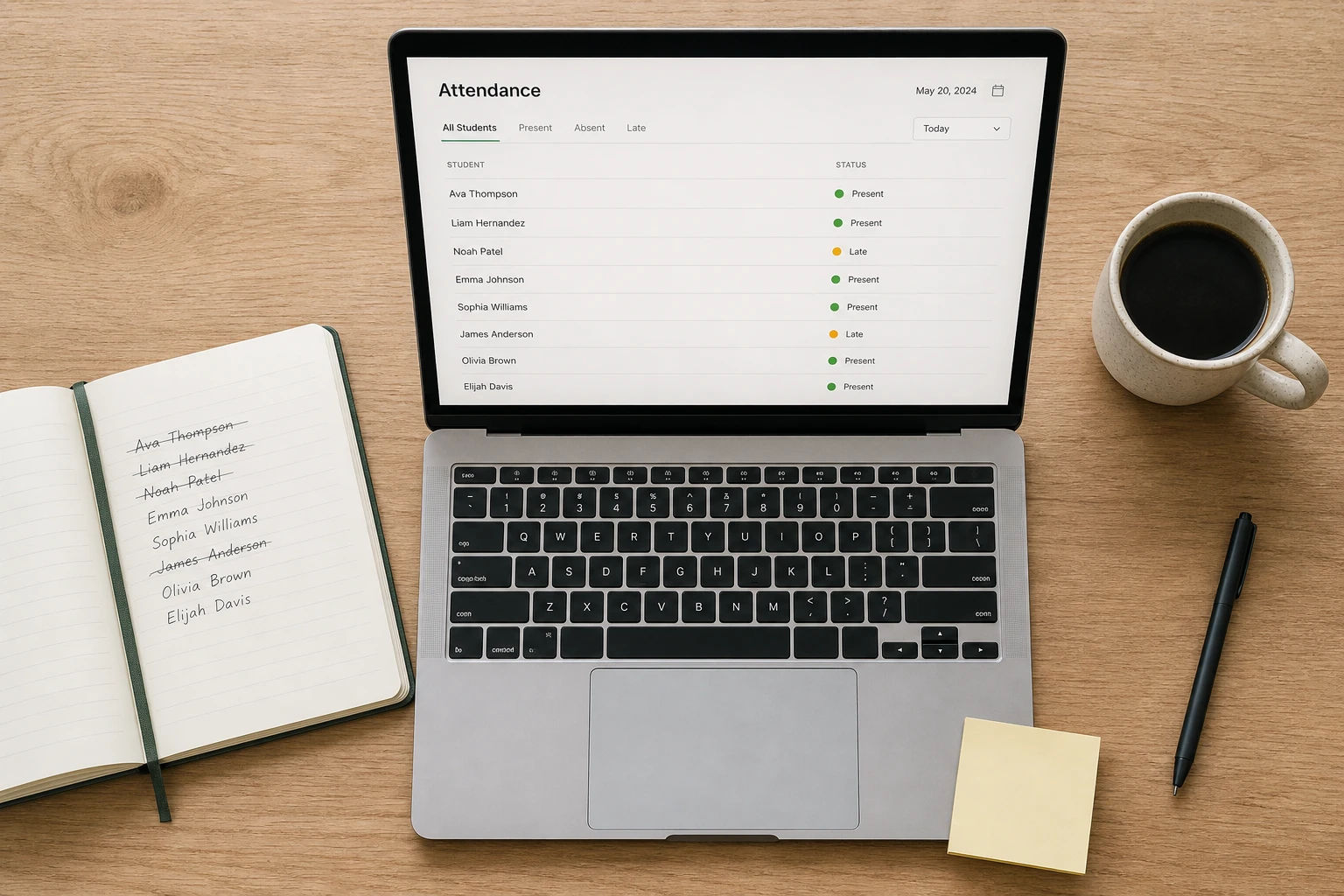
When you open your class on any given day, you see a list of your students. Next to each name is a set of status options: Present, Late, Excused Absent, or Unexcused Absent. You click the status for each student and move on. There is nothing to type, no column to navigate to, no risk of marking the wrong row. The layout is designed for quick, accurate marking.
For a class of 25 students, the whole process takes somewhere between 90 seconds and two minutes, depending on how quickly you move through the list. That is a significant change from a paper register or a spreadsheet where you are writing or typing each entry.
The four-status system is worth noting specifically because it reflects real classroom situations. A student who missed class with a doctor's note is different from one who just did not show up. A student who arrived ten minutes late is worth recording separately from one who was there on time. Being able to mark these distinctions accurately means your records are more useful later, whether that is for a parent conversation or an end-of-term report.
Feature 5: Auto-Save in Real Time
Every attendance entry saves the moment you make it. There is no save button to click, no form to submit, and no risk of losing your work if you close the tab or your phone dies halfway through marking.
For teachers marking attendance during a class transition, this matters more than it might seem. You mark attendance, the bell rings, you close your laptop and head to the next room. Everything is already saved. You do not have to remember whether you saved before leaving. You do not come back later to find the session blank because you forgot to hit confirm.
Auto-save also makes it practical to mark attendance incrementally. If a student arrives late after you have already closed the register, you can open the class, update that one entry, and close again. It saves instantly. No need to re-enter anything or redo the whole session.
Feature 6: Academic Year Management
Each class on DigiAttend has its own academic year start and end dates. You set these when you create the class and they stay in place for the whole year.
The practical benefit is that your reports and attendance calculations automatically stay within the right time boundary. If you are generating an end-of-term report, the system only pulls data from inside the academic year you defined. Data from a previous period, or from before you started using the platform, does not bleed into the current year's numbers.
This is especially useful if you teach the same subject to a different group of students from one year to the next. You can archive the old class and start fresh for the new term without losing the previous year's records.
For a tutor who runs ongoing batches with no fixed school calendar, this feature also lets you define a custom period that makes sense for your situation. You are not forced into a September-to-June structure if your tutoring cycle runs differently.
Feature 7: Holidays and Off-Days
The free plan lets you mark specific dates as holidays or off-days, and those dates are then excluded from attendance percentage calculations automatically.
This is one of the features that separates a proper attendance system from a basic spreadsheet. In a spreadsheet, you have to remember which dates were non-school days and manually adjust your formulas to exclude them. If you forget one public holiday, every student's attendance percentage drops by a small amount for no reason.
In DigiAttend, you mark the holiday once. The calendar flags it, attendance cannot be marked on that date, and every percentage calculation from that point forward is based only on actual school days. You do not have to think about it again.
You can add holidays globally, meaning they apply to your class automatically, or mark specific off-days that are relevant to your particular situation. If a session was cancelled because of bad weather or a scheduling change, you can mark that date as an off-day and it disappears from the calculations the same way.
Feature 8: Bulk Student Import
Instead of typing each student's name, roll number, and details into the system one at a time, you can upload your whole student list from an Excel file.
The process works like this: you download a template from DigiAttend, fill in your student information in the columns provided, and upload the file back. Your full student list is created in seconds.
For a class of 30 students, bulk import saves about 20 to 30 minutes of manual data entry. It also reduces the chance of typos in student names, which can cause confusion later when you are generating reports or searching for a specific student.
If you are switching from a spreadsheet, this is particularly useful because you likely already have your student list in some kind of tabular format. You can restructure that data to match the import template and bring it into DigiAttend without starting from scratch.
Feature 9: Custom Fields
Beyond the standard student information, you can add custom fields to store extra details that matter for your specific situation.
A few practical examples of what tutors and teachers typically add here: parent phone number, emergency contact, student ID or roll number format specific to their institution, house or section assignment, fee category, or a note about the student's learning level or subject focus.
These fields appear on each student's profile inside the class. They do not affect attendance marking, but they mean you have one place where the relevant context about each student lives. You do not have to flip between the attendance system and a separate contacts sheet every time a parent needs to be reached.
Custom fields also carry over when you export reports, so if you export an attendance sheet that includes parent phone numbers, that information comes through in the Excel file.
Feature 10: Per-Entry Notes
When you mark a student's attendance, you can attach a short note to that specific entry. The note is optional, so it does not slow down your workflow for the students where nothing needs to be documented. But for the cases where context matters, it is there.
Common uses for attendance notes include: noting that a student provided a medical certificate for an absence, recording that a latecomer arrived 20 minutes into the session, explaining that an absence was pre-approved by the student's parent, or flagging that a student left early due to illness.
These notes sit inside the attendance record for that date. When you generate a report later, the notes are visible in the exported file. If a parent or administrator questions a specific absence several months down the line, you can pull up the entry and show exactly what was recorded at the time.
For teachers and tutors who deal with parents regularly, this feature is underrated. Having a written note attached to a disputed absence record is a much stronger position than trying to remember what happened three months ago.
Feature 11: Excel Report Export
With one click, you can export a full attendance report for your class to an Excel file. The report includes every student, their attendance status for each day in the selected date range, a breakdown of Present, Late, Excused, and Unexcused counts, and the calculated attendance percentage.
This works the same way on the free plan as it does on every paid plan. There is no limit on how many reports you can generate, no watermark on the exported file, and no need to upgrade to access the export button.
The export is useful in several situations. A parent asking for their child's attendance record can be sent the file directly. A school or coaching center asking for documentation at the end of term gets a clean, formatted spreadsheet. If you want to keep a local backup of your records outside the platform, you export and save the file.
For teachers who still work in environments where paper records or physical backups are expected, this feature bridges the gap between a digital system and the paper-based expectations of the institution around them.
What the Free Plan Is Actually Best For
Putting all of that together, here is where the free plan genuinely fits without any compromise:
A private tutor managing one batch of students, whether that is 8 students or 28, who wants to replace a notebook or spreadsheet with something faster and more reliable. You get the full attendance workflow, auto-save, holiday management, notes, custom fields, and Excel export. Nothing is missing.
A classroom teacher testing digital attendance for the first time before recommending it to their school or department. The free plan gives you a real experience of how the system works across a full term, not just a short demo.
A part-time instructor running one evening class or weekend batch who wants organized records without paying for features they will never use. One class, one login, everything included.
A solo educator who has been using spreadsheets but keeps running into errors, broken formulas, or messy holiday calculations. The free plan solves all of those problems for a single class with no financial commitment.
When the Free Plan Is Not Enough
The honest answer here is that the free plan runs out of room in three specific situations.
If you teach more than one class or batch, you need the Teacher plan. At $19.99 per month, it covers up to five classes and 200 students. If you go annual, the cost drops to roughly $16.99 per month.
If you have more than 30 students in a single class, the Teacher plan handles up to 200 students, which covers almost every individual teacher's needs.
If you run a coaching center with more than one teacher who each need their own login and class access, you need the Tutor+ plan at $34.99 per month. This supports up to three teacher accounts, ten classes, and 500 students, and adds a manager account for oversight.
None of these upgrades involve losing your data or starting over. Your existing class, students, and attendance records carry across when you upgrade. The transition is just a payment and a plan change.
Frequently Asked Questions
Q1: Does the DigiAttend free plan ever expire?
No. It is genuinely free forever, not a free trial. There is no end date on the free plan, no countdown to when it converts to paid, and no requirement to add a credit card. You can use the free plan indefinitely as long as your needs stay within one class and 30 students.
Q2: Can I export attendance reports on the free plan?
Yes. Excel export is included in the free plan with no restrictions. You can generate and download reports as often as you need, for any date range within your academic year.
Q3: What happens to my data if I upgrade from the free plan?
Everything carries over. Your class, your student list, your attendance history, and any notes you have added all remain exactly as they are when you upgrade. You are not starting fresh, just expanding the limits.
Q4: Can I add parent contact information on the free plan?
Yes. Custom fields let you add parent phone numbers, emergency contacts, or any other details that are relevant to your students. These fields are available on the free plan.
Q5: Is the free plan useful for a full school year or just for testing?
It is designed to be useful for a full year. Academic year management, holiday tracking, and long-term attendance records all work the same on the free plan as on paid plans. A teacher managing one class through an entire academic year can do that on the free plan without hitting any limitations related to time.
Q6: Does the free plan include all four attendance statuses?
Yes. Present, Late, Excused Absent, and Unexcused Absent are all available on the free plan. You are not limited to just present and absent.
Q7: What if I start on the free plan and later need more than 30 students?
When you approach your limit, DigiAttend will let you know. At that point you can upgrade to the Teacher plan, which supports up to 200 students. Your existing data carries over and you can add the remaining students immediately after upgrading.
Q8: Do I need to download an app to use DigiAttend on the free plan?
No. DigiAttend is fully browser-based. It works on any phone, tablet, laptop, or desktop through a standard web browser. Nothing to install, and the free plan works the same way as every other plan in this regard.
Final Thoughts
A free attendance tracking plan is worth using if it actually handles the work you need it to do, not just a version of the work designed to make you want more.
DigiAttend's free plan is built around the real daily needs of an individual teacher or tutor: mark attendance quickly, keep records organized, manage holidays accurately, add context where it matters, and export a clean report when one is needed. All of that is included, and none of it is gated behind a paywall.
If that covers your situation, there is no reason to wait. If you eventually grow beyond one class or 30 students, upgrading is straightforward and your records come with you.
Start free at digiattend.com. No credit card required.